What Is Workflow Automation? A Guide for Enterprise Operations
Most enterprise operations teams don't have a visibility problem. They know exactly what's broken. Orders come in through a shared inbox and someone manually copies the details into SAP. Invoices arrive as PDFs, get forwarded to the right person, then wait. A customer complaint lands in Outlook at 9am and gets resolved at 4pm, after three people touched it.
Workflow automation is supposed to fix that. Understanding what it actually is, and what it takes to work at enterprise scale, is where most teams start.
What is workflow automation?
Workflow automation is the use of software to execute a sequence of tasks automatically, based on defined triggers, logic, and rules, without requiring a person to initiate or complete each step manually.
A workflow is any process that moves work from one state to another: a customer inquiry that becomes a resolved case, a purchase order that becomes a shipped delivery, an employee request that becomes an approved action. Workflow automation connects those steps and runs them without human hands on every handoff.
The goal is not to remove people from the process. It is to remove people from the parts of the process that do not require human judgment.
How does workflow automation work?
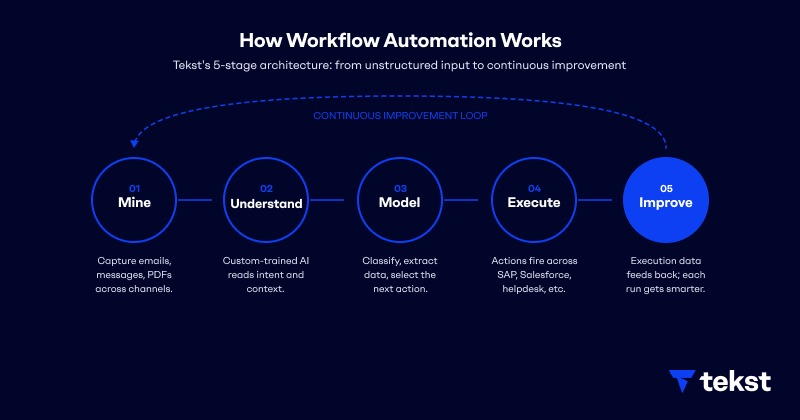
The way workflow automation works depends heavily on the platform. Rule-based tools follow a fixed trigger-action sequence. Modern enterprise automation adds an intelligence layer on top. Tekst's architecture breaks it into five stages that reflect how enterprise operations actually run.
- Mine. Unstructured communication arrives: emails, messages, PDFs, attachments. Conversation Mining and Process Mining capture every event across channels, converting it into traceable operational data. This is the step most automation tools skip entirely: they wait for clean, structured input that the inbox never provides.
- Understand. Custom-trained AI models analyse what arrived. Not with generic pattern matching, but with models trained on your company's specific language, products, customers, and edge cases. The system reconstructs how work actually flows through your organisation, not how the flowchart says it should.
- Model. The AI classifies intent, extracts the relevant data fields, and selects the next action. An order is matched to a product code. A complaint is categorised by type and urgency. A claim is validated against business rules. This happens in milliseconds, across languages and document formats, without a rule being written for every possible variation.
- Execute. Actions fire across your enterprise systems. SAP creates the order. Salesforce opens the case. The helpdesk assigns the ticket. The customer receives a confirmation. No person copied anything between systems.
- Improve. Every execution generates feedback. Was the classification correct? Did a person intervene? That data flows back into the model. The same workflow is measurably more accurate after 90 days than it was on day one, not because someone retrained it manually, but because the loop is built to learn from production.
Workflow automation vs. RPA vs. business process automation
These three terms get used interchangeably and they should not be.
Robotic process automation (RPA) automates individual, repetitive tasks by mimicking human actions in a user interface. It works well in predictable environments. It breaks the moment something changes: a new field layout, a document in a different format, a customer who writes in a language the bot was not trained on. Industry estimates put RPA failure rates between 30 and 50 percent, and maintenance often consumes the majority of the original investment once bots are live.
Workflow automation is broader. It orchestrates multi-step processes across systems, not just single tasks inside one application. It handles the handoffs, the routing decisions, and the integrations that RPA typically cannot manage on its own.
Business process automation (BPA) is the largest category. It describes the full automation of an end-to-end business process, which may include multiple workflows, multiple departments, and multiple systems working in sequence. Workflow automation is the building block. BPA is what you build with it.
What about tools like Zapier, Make, and n8n?
Zapier, Make, and n8n are excellent tools. They connect apps, automate linear trigger-action sequences, and get teams moving fast without writing code. For a marketing team syncing form submissions to a CRM, or an ops team routing Slack notifications to a spreadsheet, they do the job well.
The ceiling appears when the input is not clean and structured.
These platforms work on the assumption that the data arriving at the trigger is already formatted, labelled, and machine-readable. They move structured data between systems. They do not read an email, interpret the intent behind it, extract the relevant fields from a free-text body or a PDF attachment, and decide how to route the case in SAP or Salesforce based on context they had to infer.
That gap is not a product limitation so much as a category difference. Zapier, Make, and n8n automate what happens after the data is ready. Enterprise workflow automation starts one step earlier: at the point where unstructured communication arrives and someone still has to read it to know what to do next.
For organisations processing tens of thousands of emails, orders, invoices, and service requests per year, that earlier step is where the real work lives. It is also where no-code integration tools stop and a different kind of platform begins.
Where workflow automation breaks down in enterprise
Standard workflow automation assumes the inputs are clean and predictable. In enterprise operations, they rarely are.
A logistics team managing 250,000 emails per year is not dealing with neatly structured requests. Orders arrive with missing fields, delivery exceptions come with attached PDFs, and customer replies reference previous conversations that no system has tracked. The shared inbox is where most enterprise processes actually originate, and it is the last place most automation tools look.
This is where knowledge workers become the bottleneck. They read the email, interpret the intent, extract the relevant data, and enter it into the right system. They are, effectively, the integration layer. And most enterprises have already automated at least one workflow, according to multiple industry surveys, yet the inbox stays full.
The problem is not adoption. It is that most automation was built for the structured world, and most enterprise work lives in the unstructured one.
What enterprise workflow automation looks like in practice
Enterprise workflow automation handles unstructured inputs. It reads emails, interprets intent across languages and formats, extracts the relevant data, and executes across systems without breaking on edge cases.
The difference is the Mine-to-Execute pipeline described above: a platform that captures communication, understands context, models the decision, acts across systems, and improves from every run. That closed loop is what separates platforms built for enterprise operations from tools built for app connectivity.
It is also why deployment timelines look different. Enterprises running this architecture typically reach production accuracy in three to six weeks, not six months, because the system learns from your actual operational data rather than requiring manual configuration for every edge case.
For a detailed look at how this works in practice, including customer results and how AI-powered workflows differ from the automation approaches that came before, see What are AI-powered workflows?
Workflow automation examples across the enterprise
The highest-impact use cases share one characteristic: they start in the inbox, where most enterprise processes originate, and they touch at least two systems before they close.
- Order intake in manufacturing and distribution, where orders arrive by email, PDF, and EDI, and need to be matched to product codes and entered into the ERP.
- Accounts payable, where invoices arrive in multiple formats and the workflow extracts, validates, and routes them for approval without manual handling.
- Customer service triage, where every incoming case is classified, enriched with account history, and assigned to the right team in seconds rather than hours.
- Complaint handling, where the intent is detected, the relevant order or case is retrieved, and the response is drafted before a human ever opens the thread.
- Quote to Cash, where the full cycle from incoming quote request to confirmed order is handled automatically: intent detected, pricing validated, order created in the ERP, and confirmation sent, without manual steps between systems.
- HR and payroll operations, where employee requests are logged, prioritised, and routed based on type and urgency, without sitting in an unread queue.
Workflow automation and the systems that already run your business
Workflow automation does not replace your ERP, CRM, or communication stack. It connects them. SAP, Salesforce, Microsoft Dynamics, and shared Outlook inboxes all remain the systems of record. What changes is the layer in between: the intelligence that reads what comes in, decides what to do, and executes across those systems without a person in the middle.
Most enterprises already have the systems. What has been missing is the layer that reads the unstructured reality of daily operations and turns it into action. That is the shift workflow automation makes when it is built for how enterprise work actually runs.


Discover the impact of AI on your enterprise. We're here to help you get started.