AI Order Processing: How AI Reads, Validates and Enters Orders

AI order processing is the use of AI to read incoming customer orders in any format, check them against customer and product master data, and enter them into the ERP as sales orders, with a person approving or correcting anything the AI is unsure about. It replaces the manual step where someone opens an email, reads the attached PDF and retypes every line into SAP.
Most B2B orders do not arrive as clean EDI messages. They arrive as PDF attachments, spreadsheets, scanned forms and lines typed straight into the body of an email, each in the customer's own layout and language. Template-based OCR handles the formats it was set up for; everything else lands on someone's desk. At Mitsubishi Chemical Group, 60% of orders required manual entry, taking up 20% of inside sales time, while the template-based OCR in place handled only 4% of orders. This guide explains how AI order processing works, how it differs from OCR and EDI, what still needs a person, and what the result looks like in SAP.
What is AI order processing?
AI order processing applies language models, trained on a company's own products, customers and order history, to the order intake step of the quote-to-cash process, often called order-to-cash in ERP and finance teams. Instead of matching characters to fixed positions on a page, the AI reads an order the way an experienced order desk employee does: it works out who is ordering, what they want, how much, where it has to go and when.
It is the reading and understanding layer inside sales order automation. Sales order automation describes the full flow from capture to acknowledgment. AI order processing is about how the machine makes sense of the order in the first place, and that is where most automation projects succeed or stall.
How AI order processing works, step by step
Five steps take an order from the inbox to a confirmed sales order in the ERP.
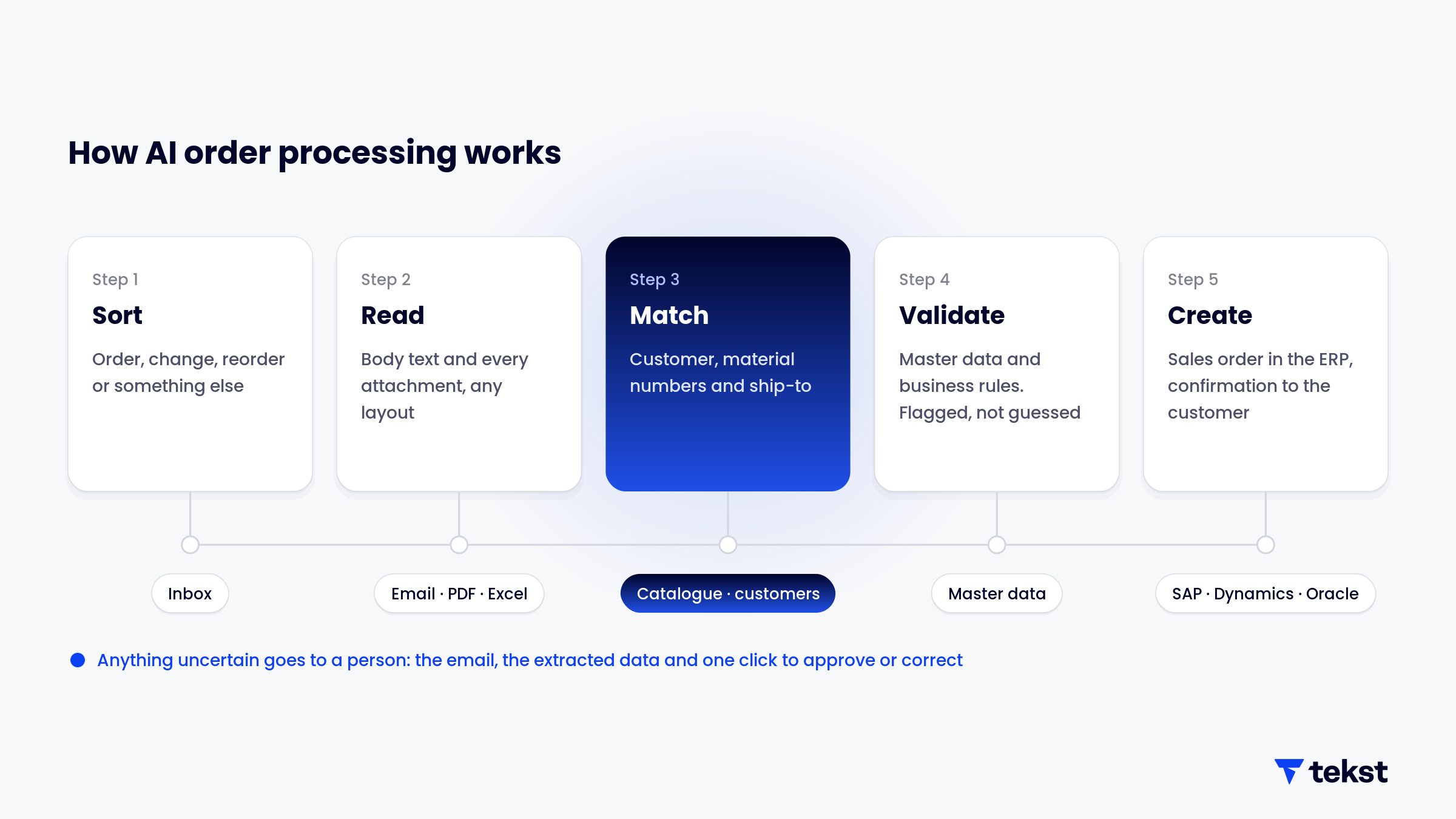
1. Sorting orders from everything else in the inbox
An order inbox receives far more than orders: delivery questions, invoice copies, complaints, price requests and changes to orders already placed. The first job is classification. The AI decides whether a message is a new order, a change to an existing order, a reorder or duplicate, or something that belongs with another team, and routes it accordingly. Dossche Mills reached over 95% classification accuracy across its EMEA customer service mailboxes.
2. Reading the order, whatever the format
The AI reads the email body and every attachment together: a PDF purchase order, an Excel sheet, a scanned form, a forwarded thread. It extracts the header data, such as the customer's PO number, the requested delivery date and the delivery address, and every order line with its product reference, quantity and unit. Because it reads meaning rather than layout, a customer who changes their PO template does not break the process.
3. Matching the customer, products and ship-to
Extraction alone is not enough. "BX-200 blue, 12 boxes" has to become a material number, a quantity and a unit that exist in the ERP. The AI matches the sender to the right sold-to customer, maps customer article numbers and descriptions to internal material numbers, and picks the correct ship-to address among the customer's delivery locations. This is the step where training on the company's own catalogue and order history matters most.
4. Validating against master data and business rules
Before anything reaches the ERP, the order is checked. Does the material exist, and is it sold to this customer? Is the unit of measure valid for the product? Are the mandatory fields there? Has this order already been entered? Anything that fails a check is flagged, not guessed. Credit checks, available-to-promise checks and pricing are not part of this step: they remain ERP functions.
5. Creating the sales order and confirming
The validated order is written into the ERP as a sales order, and an acknowledgment goes back to the customer. Where a person needs to look first, they see the original email, the extracted data and the proposed order side by side, and approve, correct or reject it in one place. Every correction feeds the next order.
AI order processing vs OCR, templates and EDI
AI order processing does not replace the other intake channels. Each one has its place.
EDI remains the best route for trading partners who can send it. OCR brought order desks out of pure manual entry. AI takes them the rest of the way: the customers who will never set up EDI, the layouts that keep changing, and the orders that are half in the email body and half in an attachment.
Where AI order processing needs help: the exceptions
The standard order is easy. The value of AI order processing is decided by how it handles everything else. These exceptions turn up in almost every order desk:
- Customer article numbers. Customers order with their own codes and descriptions, not yours. The mappings have to be learned and kept current.
- Units of measure. "10" can mean ten pieces, ten boxes or ten pallets. The unit is checked against the product and the customer's usual order sizes, and quantities that look out of line are flagged.
- Ship-to ambiguity. Large customers have many delivery locations, and an address written slightly differently still has to resolve to the right one.
- Missing information. No PO number, no delivery date, a product that cannot be identified. The AI can ask the customer for the missing detail, or route the order to a person with the question already identified.
- Changes and duplicates. A customer resends an order with one line changed, or emails a change to an order already in production. That has to update the existing order, not create a second one. See order change management.
A well-designed system does not fail silently on these cases and does not guess. It hands them to a person with the problem already pinned down.
How accurate is AI order processing?
Accuracy figures for AI order processing are often quoted without saying what was measured. Three measures are worth keeping apart:
- Classification accuracy: the share of incoming messages correctly identified as orders, changes or other requests.
- Field-level accuracy: the share of individual fields, such as quantities, material numbers and dates, that are read and matched correctly.
- Order-level accuracy: the share of complete orders entered without any correction. This is the measure that matters to the order desk, and it is always lower than field-level accuracy, because one wrong field makes the whole order wrong.
Ask which of the three a figure refers to, and test on a sample of your own orders, including the difficult ones. A system that shows how confident it is per field and sends uncertain orders for review is more useful in practice than one that quotes a single high number.
AI order processing in SAP and other ERPs
In SAP, the output of AI order processing is a standard sales order. In SAP S/4HANA, a sales order needs at least an order type, a sales organisation, a distribution channel, a division and a sold-to customer, and every line needs a material, a quantity and a unit. Fields such as the ship-to party, payment terms and currency can be derived from the customer master data when the order does not state them. The job of the AI is to deliver those values correctly. SAP then applies its own pricing, availability and credit logic, as it would for any other order.
That division of labour is deliberate. The ERP stays the system of record; the AI layer sits in front of it, reading what arrives by email and turning it into something the ERP can process. The same applies to Microsoft Dynamics, Oracle, NetSuite and other ERPs. For SAP order desks specifically, see process intelligence for SAP order management.
What to look for in AI order processing software
- It reads the whole message. Body text, attachments and earlier replies together, in all the languages and formats your customers use.
- It learns your catalogue and customers. Matching customer references to your material numbers is where accuracy is won or lost.
- It validates before it writes. Checks against master data and business rules, and flags rather than guesses.
- It keeps people in control. A clear review step for uncertain orders, inside the tools the team already uses, and a log of every action. The Tekst SidePanel works this way: the email, the extracted data and one button to approve.
- It handles changes, not only new orders. Changes to orders in flight arrive through the same inbox and need the same care.
- It measures the process. Volumes, order types, exceptions and cycle times, before and after automation.
Where to start with AI order processing
Start with the order inbox itself. How many messages are orders, how many are changes, how many are something else? Which formats arrive, from which customers, and which exceptions come back again and again? In one order desk audit Tekst has published, 4,514 orders followed 1,314 different paths, and every time an order arrived without complete technical data, the rework cycle between inbox and SAP added more than 14 hours. Numbers like these decide where automation pays off first.
Then automate the most frequent, best-understood order types, keep a person approving the rest, and widen the scope as accuracy is proven on your own orders. That is the order Tekst works in: process intelligence to see how orders really flow, then agentic automation to process them in the systems the team already uses. Asteria took this route for order intake across more than 33 subsidiaries in 10 countries, each with its own processes and languages.
Discover the impact of AI on your enterprise. We're here to help you get started.